Guhindura PDF mu buryo bworoshye kandi bwizewe — in Mucukumbuzi yawe
Chrome, Edge, na Firefox Android
I Kwiyongera NONEAHA
Kuri kugirango Icyatoranijwe Mucukumbuzi
Reka tuvuge ko urimo ushakisha urubuga, ugashaka ingingo, ifoto, cyangwa se urutonde rw'amafoto. Kuri Kubika,, Gusangiza, Cyangwa Reba Ntibicometse kuri interineti. Aho gukoporora, gupfundikira, cyangwa gukoresha ibikoresho bya gatatu bya clunky, byagenda bite uramutse ubihinduye PDF — ako kanya, hamwe no gukanda rimwe, kandi rwose ku gikoresho cyawe?
Iyi niyo foto ya Pdf Converter : Save as Pdf offers Si ngombwa ko uba uri wenyine kuri Chrome kuko iboneka kuri browser nyinshi na platform.
Kuki iyo ndunduro yagutse?
✅ Bye bye PDF downloads (From Webpages)
Ukanze rimwe gusa - "Guhindura Ipaji ya none kuri PDF" — inyongera ikoresha moteri ya PDF kavukire ya mushakisha yawe kugirango ikore verisiyo yuzuye, yo hejuru ya PDF yurupapuro. image, image, image, image — Alles resetten. OYA Ibuze Ibintu Icyo ubona nicyo ubona.
Kubakozi bahuze, abanyeshuri, abashakashatsi, cyangwa umuntu wese usoma kumurongo — ibi bivuze ko ushobora kubika inyandiko, blogs, amakuru, raporo, cyangwa ikintu icyo aricyo cyose gifite akamaro hamwe numurabyo wihuta.
🖼️ Image Resize — Not Bare Image Resize
Kuri GUHINDURA A,,, Cyangwa Icyo ari cyo cyose Ishusho? in Guhindura > > Ishusho Ntibicometse kuri interineti Oya Igicu Inonosora Oya kiri kuri interineti Seriveri
Ni byiza cyane ku buryo:
- Fotokopi y'indangamuntu yawe cyangwa ya telefone yawe
- Inyandiko
- Ihangagishusho
- Cyangwa Ibishushanyo
Na: A — na Iyimura Ako kanya.
🗂️ In
I Umugereka Kureba Bya hafi Idosiye in Mucukumbuzi — Oya ya: Birenga. Shyira PDF kuri mudasobwa yawe maze uhite uyifungura muri browser yawe. Biroroshye, birasukuye, kandi birakora neza.
🔒 Byuzuye hanze ya interineti & Ubwirinzi
Guhindura byose — urupapuro rwa → PDF, ishusho → ya PDF, cyangwa imiterere y'ishusho — bibera ku gikoresho cyawe. Kuri Seriveri Ibi bivuze ko inyandiko zisobanutse, amafoto yihariye, cyangwa inyemezabwishyu y'ibanga bikomeza kuba ibanga. Umwirondoro ntushobora gukusanya cyangwa kohereza amakuru yawe. Umutekano n'ubusugire by'igihugu birarimbanyije.
⚡ Biroroshye, biroroshye kandi birihuta
< Uburemere UTSINDAGIYE Ingano Kinini kugirango Cyangwa Iyimura Bitewe na moteri ya PDF ya browser yawe, guhinduranya birihuta kandi bikoresha neza umutungo. Ibyo bishatse kuvuga ko mudasobwa yawe, PC cyangwa telefoni yawe idashobora kugenda buhoro. Waba uri kuri interineti cyangwa uri kuri interineti — birakora.
📚 Agasanduku k'ibikoresho ka PDF k'ibikoresho byose
Kuki buri wese yicara hamwe agakorana umwete mu gihe undi akorana umwete? iyi Kwagura Kubona:
- Kuri
- To PDF (quick image image)
- < Uburemere UTSINDAGIYE
- Amahuza Kuri Birenzeho Urwego rwo hejuru — Gukomatanya, Gutandukanya, Gukomatanya, GUHINDURA/Kuri, Ishusho, na Birenzeho (Biturutse external Ibikoresho)
Kwiyongera, Gukoresha byinshi. Byose bitunganyirijwe mu buryo butujuje ubuziranenge.
Ninde wababonye cyangwa wabakunze? — Agakiza_ubutumwa bwiza Agakiza_Ubutumwa bukiza
📖 Abanyeshuri n'abanyeshuri
- Kubika,, Ibisobanuro, Cyangwa Urubuga Nka ya: Ntibicometse kuri interineti Cyangwa Icapa.
- Guhindura inyandiko cyangwa amafoto yanditswe n'intoki muri PDFs kugirango bishobore gusaranganywa byoroshye cyangwa kubika.
👨💼 Abakozi ba kure n'abakozi ba kure
- Kuramo inyemezabwishyu, inyemezabwishyu, raporo, cyangwa amasezerano nka PDF muburyo butaziguye kurubuga.
- Igikubo Ishusho (Urugero: Inyandiko) A UMWE Idosiye — ya:, Gusangiza, Cyangwa Inyandiko -.
🗂️ Abakoresha buri munsi na Minimalistes
- Kubika Icyatoranijwe, Inzira, Cyangwa - Kuri Amabwiriza Kuva: i Urubuga ya: Ntibicometse kuri interineti —, Byahinduwe.
- Guhindura amashusho cyangwa amafoto muri PDF kugirango usangize inshuti, umuryango, cyangwa abakiriya.
🎨 Abategura ibitaramo, abategura ibitaramo, abategura ibitaramo
- Ihangagishusho,, Cyangwa Ishusho in Cyangwa Ibibanjirije.
- Umukiriya Kwinjiza porogaramu Birenga — in Mucukumbuzi.
🛡️ Umwirondoro w'abakoresha
- Niba ukorana n'inyandiko z'ibanga, amafoto yihariye, cyangwa amakuru yihariye — guhinduranya udakoresheje interineti bivuze kutagira ibyago byo kumeneka.
- IDOSIYE Oya Seriveri Oya
Uko bikorwa_Akabando k'iminsi
- Install the extension — One click, depending on your browser.
- When viewing a web page you want to save: click the extension icon → "Convert Current Page to PDF" → download your file.
- To convert an image: open Quick Image Converter → choose image(s) → select output (PDF / JPG / PNG / WebP) → convert → download.
- Need to open a PDF already on your device? Use "View Local PDF" — select the file → view instantly in browser.
- Need more advanced PDF tools? Use the "More PDF Tools" section to quickly access compress, split, merge, Word-to-PDF, PDF-to-Word and more.
No plugins, no logins, no subscriptions. If your browser works, this extension works.
Available Browsers — Get It Where You Work
- Google Chrome — install directly from the Chrome Web Store.
- Microsoft Edge — get it via the Edge Add-ons store: https://microsoftedge.microsoft.com/addons/detail/image-to-pdf-converter-/pocgdifigllbdfpkplhhghljnbnlgkld
- Firefox Android — install the compatible version via Mozilla Add-ons: https://addons.mozilla.org/en-US/android/addon/web2pdf-converter-save-as-pdf/
No matter your device or browser — you can enjoy the same fast, private, offline conversion capabilities.
< B B
- 📄 Archiving Content — bloggers, journalists, and avid readers can save articles or research material for offline reading or citation.
- 🧾 Document Submission — scan photos of documents (e.g. bills, certificates), convert them to PDF, combine multiple images into one file, and send as a professional-looking document.
- 🗂️ Organizing Visual Projects — photographers or designers can convert a batch of images into PDF portfolios or mood boards.
- ✈️ Travel Planning — save web itineraries, booking confirmations, maps, or hotel pages as PDFs — accessible even without internet.
- 🖨️ Print-Friendly Archiving — convert webpages or images to PDFs for printing or offline storage.
- 📚 Study Materials — students can compile images, slides, notes, and web resources into a single PDF for easy review.
What Makes Image to PDF Converter Different
While there are many online tools and services offering image-to-PDF or webpage-to-PDF conversion — such as web-based converters or even manual "Save as PDF" via browser printing — Image to PDF Converter stands apart because:
- It works entirely offline — no uploading your images or pages to external servers; your data never leaves your device.
- It leverages your browser's native PDF engine, delivering high-quality output without heavy resource usage or extra software.
- It combines multiple tools — not just webpage savings or image conversion, but also local PDF viewing and quick access to advanced PDF utilities.
- It's designed to be user-friendly — minimal clicks, intuitive interface, and no technical expertise required.
- It's versatile across browsers — Chrome, Microsoft Edge, and Firefox Android.
- It's privacy-centric — ideal for anyone working with sensitive documents.
Unlike many online converters that demand file upload (raising privacy concerns), or manual "Print to PDF" workflows that require configuring settings — this extension is seamless, fast, and secure.
How It Works
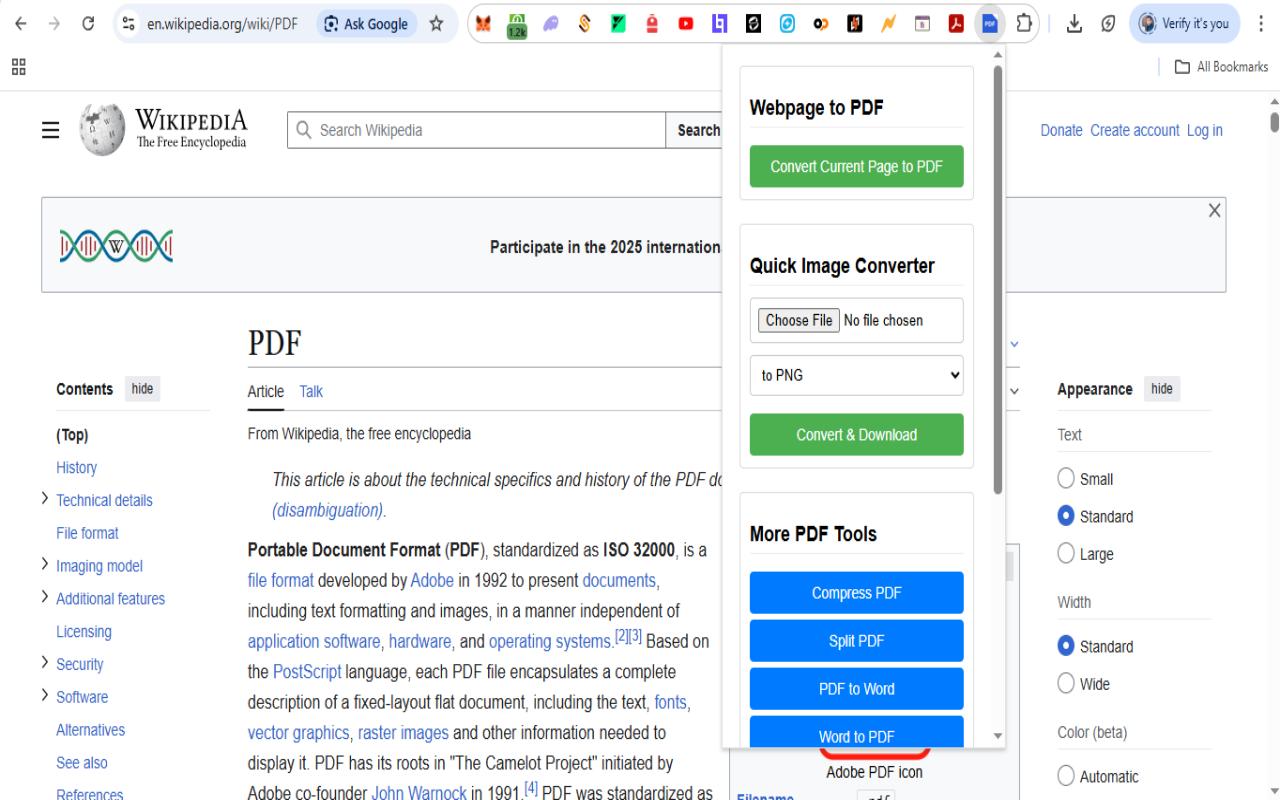
Step 1: Visit Any Webpage
Open any webpage or image you want to convert to PDF in your browser.
_1764434629881.jpg)
Step 2: Click Extension Icon
Click the Image to PDF extension icon in your browser toolbar to open the conversion panel.
_1764434629825.jpg)
Step 3: Convert to PDF
Select conversion options and click 'Convert & Download' to instantly create your PDF file.
_1764434629768.jpg)
Step 4: Download & View
Your PDF is ready! Download it instantly or view it directly in your browser.
Ya:


FAQs — What People Usually Ask
Real Benefits You'll Actually Feel
- 🔁 Instant gratification — Convert and get a PDF in seconds, no waiting, no loading bars.
- 🔐 Peace of mind — Sensitive docs and personal photos stay private; no third-party servers involved.
- 🧑💻 Streamlined workflow — From webpage to PDF to local viewing — all in one place; no jumping between apps.
- 📂 Declutter & organize — Compile scattered images, webpages, screenshots into clean, shareable PDF files.
- 🌍 Work anywhere — Whether at home, office, or on the go — offline functionality ensures you're never stuck without connectivity.
- 🪶 Lightweight & fast — No heavy installs, no system slowdown. Ideal for older PCs or low-resource devices.
- 📱 Cross-browser & cross-device — Whether on desktop Chrome/Edge or mobile Firefox Android — enjoy consistent PDF tools everywhere.
Try It Today — And Transform How You Manage Content
Stop juggling multiple tools, avoid risky online upload services, and say goodbye to messy workflows. Whether you're saving a blog post for offline reading, converting screenshots for a project, organizing your documents, or archiving research — Image to PDF Converter : Save as Pdf makes it effortless.
Get it now:
- Chrome — install from Chrome Web Store
- Edge — install from Edge Add-ons store
- Firefox Android — install from Mozilla Add-ons
Then: open any webpage or image → click "Convert to PDF" → download and enjoy your PDF.
That's it. Instant, safe, efficient — and available on your browser of choice.
Start using it today, and discover how simple PDF management — and digital organization — can be.